
From
pdf
Get Started for FREE
Sign up with Facebook Sign up with X
I don't have a Facebook or a X account


 Your new post is loading...
 Your new post is loading...
Your new post is loading...
 Scoop.it!
Robin Good's insight:
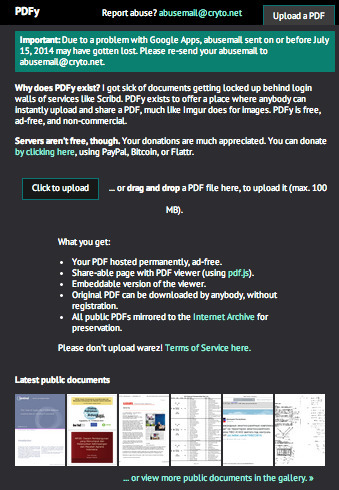
If you are looking for an alternative free service to upload and share your PDF documents without requiring to register, login or pay fees, check out PDF.yt. The free, non-commercial web service (which is supported by your donations) allows you to upload as many PDF files as you wish, with a max file size of 100MB. You don't need to register or login to upload a PDF file, but once uploaded you cannot deleted anymore. PDF files are hosted permanently, can be viewed online along view stats, can be downloaded by anyone, there are no ads being displayed, and best of all, they are all permanently mirrored and archived on the Internet Archive Servers. An excellent alternatives to the likes of Slideshare, Scribd, Issuu or similar services and the perfect complement to permanently archive any PDF you don't want to lose track of. Free to use. Try it out now: https://pdf.yt/

Scoop.it!
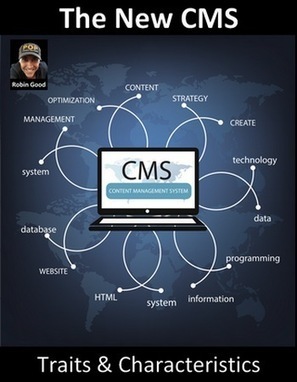
Once upon time, back in the years before 2010, the CMS was an instrumento to create, organize, manage and publish content on a specific web property, website or blog. This classic CMS was characterized by its ability to: support
Robin Good's insight:
The new CMS is the profile of an emerging new type of content management systems that is not bound anymore to a specific web site and which acts as a hub to first gather, aggregate and filter relevant content, and then to create, edit and format it for scheduled publishing across multiple devices and types of output (email, RSS, ebook, social media, web site, blog, etc.). Great examples of this new type of CMS are at one end of the continuum tools like Shareist, OpenTopic and B2BContentEngine and at the other simpler ones like Kurasie, Hootsuite. Here is my take on which other the key defining characteristics of this new breed of online publishing tools. Full article: http://www.masternewmedia.org/the-new-cms/ Reading time: 13'
Scoop.it!
Robin Good's insight:
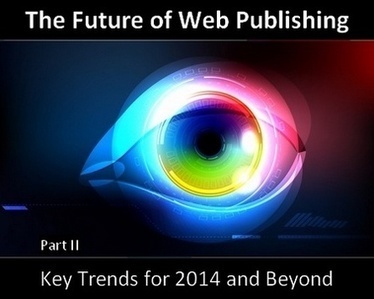
What's ahead of us when it comes to web publishing? How will the tools, methods and approaches to design, to create and to package news and information change over the course of the next few years? In the second part of this article, I am looking at these key trends: 1) Dusk of Blogs 2) Beyond WordPress 3) Instant Publishing 4) Invisible UI 5) Design Intelligence 6) Design Marketplaces Full article: http://www.masternewmedia.org/future-webpublishing-trends-beyond-2014-part2/ Reading time: 19' See Part I here: http://www.masternewmedia.org/future-webpublishing-trends-beyond-2014/

Barbara Saunders's curator insight,
February 19, 2014 12:07 PM
. . .hmmmm interesting thoughts for beyond 2014.
Scoop.it!

See and hear a 5-minute video of a real person using your site. It's super fast, and totally free.
Robin Good's insight:
Peek is a new online service which allows you to get a real human to visit your site and to record a custom video in which your site is explored with the eyes of a first time visitor and with the recording of his own voice recounting his first time impressions. The result is invaluable for any serious web publisher wanting to improve the organization, usability and design of its web site. To use Peek you only need to type the URL of your preferred web site, and then wait for an email that will provide you a link with the video. Your response time may vary, but in my case I got the video in less than hour. The clip is 6'+ minutes long and provided me immediately with lots of useful insight about what I could improve right away. Free to try and for three verifications every month. Extremely useful. I'd say invaluable. Every web publisher should try it once. Try it out now: http://peek.usertesting.com/
Scoop.it!
Robin Good's insight:
If you are looking for a simple and inexpensive way to publish a database of information on the web, check out Knack. Not only. Knack actually allows you to build very simple "apps" on top of the data or structure you have created, so that you can create a public member directory that users themselves can update or a multi-step application form or a directory of tools and services in a specific industry. All the info you publish with Knack remains under your full ownership, though the data and structure, even when published through your site, will remain on Knack servers. Prices start at $25/mo for a 10,000 records database. Free try out available. Pricing: https://www.knackhq.com/pricing/ Features: https://www.knackhq.com/features/ Database / app examples: https://www.knackhq.com/online-database-examples/ Find out more: https://www.knackhq.com/
Scoop.it!
Robin Good's insight:
Barley for Wordpress is a plugin that allows you to edit, modify and write new content directly on your article pages, and not via the typical backend posting interface. With Barley you can edit any existing web page on your site by simply clicking where you want to edit and by typing. My comment: Fantastic tool for those who hate having to deal with tech side of web publishing and for those web designers who have such clients. Barley is also a full design and publishing platform. Price: $12/year/site WordPress Plugin: http://getbarley.com/editor/wp More info: http://getbarley.com/
Scoop.it!
Robin Good's insight:
Lucidpress is a web app which allows you to design, layout, format and publish most any type of document or publication without needing to buy an expensive software program. The key advantage of Lucidpress is that it offers one editing environment to prepare both print and digital publications for the web or mobile devices. Final work can be exported to high quality PDF files, or to JPG, PNG or PDF files for individual pages. Lucidpress integrates with Google Drive and it allows to easily import texts, images as well as video clips from YouTube. My comment: There is certainly a need for an easy-to-use web-based design environment for pubs of all kinds which Lucidpress attempts to intercepts. The design app is quite powerful and well designed but unless you are a designer you are going to be disappointed with the results. Available templates are few and very old-fashioned. This is probably the area where Lucidpress has the maximum opportunity for improvement. Integrating quality design into the service and non-design customers will do the rest. Free to use. Try it out now: https://www.lucidpress.com Tutorials: http://support.lucidpress.com/categories/20121236-Tutorials

Margaret Waage's curator insight,
October 30, 2013 4:46 PM
I'm testing this right now...looks like a wonderful tool. Many thanks!!
Scoop.it!
Robin Good's insight:
Snaplive is an up and coming free, open-source CMS which allows any publisher to edit the contents of its web site directly on the page, without needing to log in to a backend system. Snaplive works perfectly with WordPress and with the existing theme you are using and not only provides editing functions but it also allows you to add / create new content sections very easily. "Virtually ANY existing website or theme can become a Snaplive-powered editable website in a matter of minutes. All you need to do is add an HTML5 attribute to the div that will contain editable content." My comment: I haven't tried Snaplive but the video is quite self-explanatory. While not the first system that attempts to provide in-line, on-the-page content editing and creation, the fact that that is free and open-source, that it can work with most any existing web sites and with any WordPress theme makes it very interesting for many a web publisher. If installing and configuring is as easy as it is promised, then this could be a godsend both for many website designers as well as for their clients. My compliments to Niccolò Broggi for designing such a cool, elegant and useful tool. Currently in private alpha. For more info check: http://snaplive.org Blog: http://snaplive.org/blog/ Please do support this project with your contribution here: http://www.indiegogo.com/projects/snaplive-go-live-in-a-snap--12/x/3977105
Scoop.it!
Robin Good's insight:
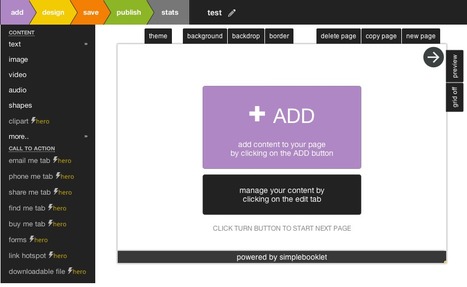
Simplebooklet is a free web-based app which allows you to convert your existing PDFs into a flippable browser-based format, or to create brand new ones from scratch by leveraging a nice set of professional ready-made templates. Simplebooklet makes it easy to integrate text, images, video clips, audio tracks, geometric shapes, clipart and a number of call-to-action modules for selling, subscribing, and other lead generation actions. The final publication looks like a web magazine with flippable pages and with useful buttons to see all pages thumbnails, to share on social media or to download bonus files. A PRO version costing $36/year allows for creating up to 50 booklets, for uploading PDFs as large as 100MB and for integrating downloadable files as well as call-to-action modules such as email me, buy this or subscription forms. My comment: Quite useful to convert PDFs into flipboard style web-magazines which are and will increasingly be the new of reading on the web. Excellent integrated-design features make it possible also to create flippable multimedia booklets from scratch that will have a professional-look no matter your level of design expertise. Worth trying. Still in beta and buggy. Try it out now: https://simplebooklet.com/ Templates examples: https://dl-web.dropbox.com/spa/782adzfe036gp2y/4url7xiw.png https://dl-web.dropbox.com/spa/782adzfe036gp2y/tse7xajp.png

McSotos's curator insight,
September 1, 2013 1:42 AM
Simplebooklet is a free web-based app which allows you to convert your existing PDFs into a flippable browser-based format, or to create brand new ones from scratch by leveraging a nice set of professional ready-made templates.
Simplebooklet makes it easy to integrate text, images, video clips, audio tracks, geometric shapes, clipart and a number of call-to-action modules for selling, subscribing, and other lead generation actions.
The final publication looks like a web magazine with flippable pages and with useful buttons to see all pages thumbnails, to share on social media or to download bonus files.
Scoop.it!
Robin Good's insight:
SubToMe is a free script which allows you both to add a simple button to your web site that makes it extremely easy for your readers to subscribe to your updates with their favorite news reader as well as for you to subscribe and follow and web site you happen to run into. Here's what to do to make any page you have subscribable: https://www.subtome.com/#/publishers Notes for developers: https://www.subtome.com/#/developers WordPress widget: http://wordpress.org/extend/plugins/subtome Partner reader apps: https://www.subtome.com/#/store Find out more: https://www.subtome.com/#/
Scoop.it!
Robin Good's insight:
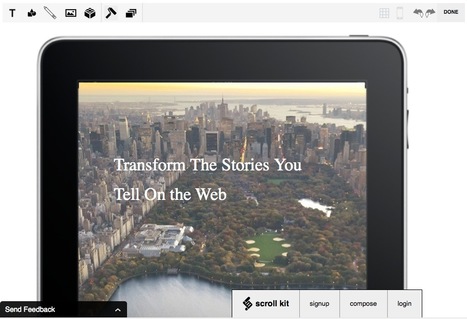
Scroll Kit is a web-based and mobile publishing editor, that can work in tandem with WordPress, and which allows you to work freely on the page by positioning and styling your content in any way you want. With Scroll Kit you can edit text in-line on the actual page, and move the text in any location you want. Alignment of different text blocks or other objects is made easy by an invisible grid that shows up only when you drag an object around. It is also possible to style text, change fonts, add images and graphic shapes, as well as embed "iframes", YouTube videos and Twitter content. A useful feature alllows you to preview how your content will look on mobile devices too. My comment: Scroll Kit is a good example of a new breed of web publishing editors, which further simplify the editor's job while providing maximum flexibility. Scroll Kit is a fantastic web design and publishing tool for web designers capable of leveraging its notable power. For those who have no design skills this may not be a great solution as having all this freedom is good only when you know exactly what to do. (Some pro-looking templates may help in this direction - a few are already available, more will hopefully come later) Here the Scroll Kit Manifesto: "The web is the most advanced publishing system we've ever had but On the web, your design is set This is true for the publishing they do at nytimes.com with their article template and it is true for the publishing you do when you type "happpppy birthday. I luv you" on the facebook page of a good friend. In print, every fiber of the page is yours to define, and on the web, the page belongs to Mark Zuckerberg or whoever coded your template. Another way is possible." Free to use. Find out more: https://www.scrollkit.com/ Try it out now: https://www.scrollkit.com/s/glmduha/try WordPress ready: http://vip.wordpress.com/plugins/scrollkit-wp/

Brad Tollefson's curator insight,
July 22, 2013 5:35 PM
Must check out... cause I agree with this.. Here the Scroll Kit Manifesto:
"The web is the most advanced publishing system we've ever had but
On the web, your design is set
Scoop.it!
Robin Good's insight:
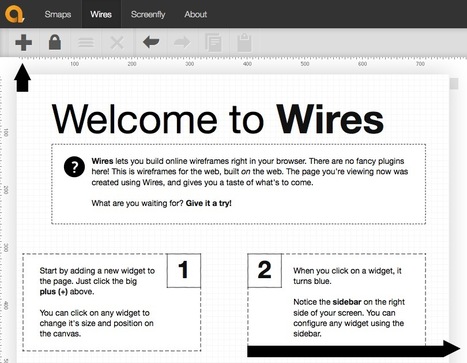
Quirktool is a free toolset for the web designer / web publisher created by @kyleschaeffer and allowing easy visual site mapping of any web site, wireframe prototyping and testing across different screen sizes. Very easy to use and intuitive. Free to use. Site mapping: https://quirktools.com/smaps/ Wireframe prototyping: https://quirktools.com/wires/ Screen testing: https://quirktools.com/screenfly/ Try it out now: https://quirktools.com/

Mr Tozzo's curator insight,
May 28, 2013 4:12 AM
Site Map, WireFrame and Test Your Site Across Different Screens with QuirkTools
Scoop.it!
Robin Good's insight:
Tint is a web servive which allows you to create very easily, and without any technical knowledge a web presence by aggregating, curating and displaying your favorite feeds, social media channels into an elegant visual layout. Tint-created websites can be easily embedded into any existing web site or integrated into any CMS such as WordPress or Tumblr very easily. Techcrunch reports: "In other words, Tint’s platform is designed to help brands create social hubs on top of their digital properties and, in turn, create a deeper level of engagement with their audiences... ...Businesses can link their Twitter, YouTube, Pinterest, Instagram, Facebook and RSS feeds to their Tint accounts, whereupon the service auto-populates the page from those feeds, serving the social content in a river that is Pinterest-like in design." Users can personalize their "tint" web pages by changing fonts, background colors, the headline, URL and image of each piece of content. "Tint also allows you to choose the dimensions you want the embedded stream to be and the number of cascading columns you want to appear, automatically serving up the embed code." All plans include one "tint" (one web page), the connection of 2 social accounts, mobile support and analytics. Depending on the paid service plan you select, you can also have additional social accounts added, a white-label implementation, moderation/curation features, additional themes, Facebook Tab, support for events, hashtag moderation, full custom CSS support and more. Free basic version available to everyone. My comment: If you wanted an alternative to RebelMouse here it is. Just like its competitor it lets you display social media feeds from specific hashtags, social media channels and Pinterest boards, adding as a unique extra support also for YouTube channels. Examples: http://www.tintup.com/clients Templates: http://www.tintup.com/pages/choosetheme Try it out here: http://www.tintup.com/ Pricing: http://www.tintup.com/pricing Forum: http://forum.tintup.com/

Paula Correia's curator insight,
April 29, 2013 11:56 AM
Tint é um serviço web que permite criar, facilmente e sem qualquer conhecimento técnico, uma presença na web ( agregando, curando conteúdos e exibindo os seus feeds favoritos ou médias sociais) com um layout visual elegante. |
Scoop.it!
Robin Good's insight:
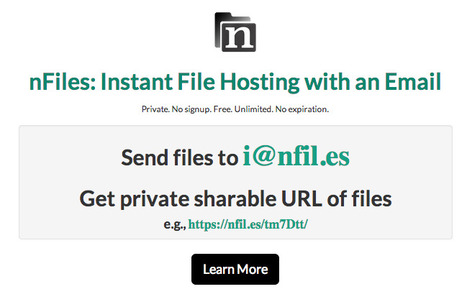
nFiles is a new free web service which allows you to easily upload, store and optionally share/publish online any content or file instantly without needing to register, setup or login into any service. To use it you simply send an email to i@nfiles.es and you get an instant email reply with personal URLs for accessing your newly created cloud storage and sharing/publishing space. The space is organized in three sections: a general folder containing all the files you have uploaded, an email page where all of the emails and their contents are stored, and an image page where all of the images you have sent in are archived. nFiles acts also as a full screen image viewer as well as universal reader for documents of any type. nFiles can turn also into an instant bare-bones web publishing system as this page can attest: https://nfil.es/w/3IhS2s/ - its contents are nothing more than the contents of an email sent to nFiles and publicly shared. Storage space is unlimited. But max upload file size is 15MB. Excellent tool for posting online images or documents rapidly and with the minimum friction. Ideal for journalists and citizen reporters in crisis situations as well as for many other reporting, sharing and educational uses. Free to use. No ads. Try it out now: https://nfil.es/ Visual guide: https://nfil.es/w/3IhS2s/ Key features: https://nfil.es/#more
Mr Tozzo's curator insight,
November 28, 2014 6:07 AM
Archive, Share and Instantly Publish Any File or Content Online via Email: nFiles
Scoop.it!
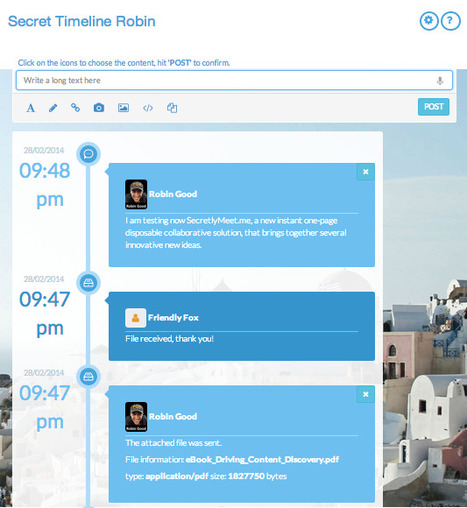
"SecretlyMeet allows to create temporary web sites that exist up to when your browser is open and is connected to the internet. When you close your browser, all is gone."
Robin Good's insight:
SecretlyMeet is a web app which allows you to instantly publish a web one-pager in which to share, post and add any type of content you want. From text, to images, video clips, freehand drawings, embed codes, to any type of file you can post and share anything you want. You can even post text by speaking into the page. The page you create lives only until you keep your browser open on it. When you and the other party close the browser the page disappears forever. To use it you just select a theme, click Start and you re provided immediately with a unique link to your page, that you can share with someone else. Unless someone else joins you on the page, you cannot start editing it. With SecretlyMeet you have an instant publishing tool that you can use to exchange and collaborate with someone else privately as if it were a multimedia page on which to share any content desired. The key benefit is that SecretelyMeetMe requires basically zero setup and configuration and you are ready to publish, collaborate and share immediately and leaves no trace of what you have been sharing behind you. A live text chat window is also available on any SecretlyMeetMe to exchange in real-time with anyone else having access to it. Free to use. Try it out now: https://secretlymeet.me/

Robin Good's curator insight,
February 28, 2014 3:57 PM
SecretlyMeet is a web app which allows you to instantly publish a web one-pager in which to share, post and add any type of content you want. From text, to images, video clips, freehand drawings, embed codes, to any type of file you can post and share anything you want. You can even post text by speaking into the page. The page you create lives only until you keep your browser open on it. When you and the other party close the browser the page disappears forever. To use it you just select a theme, click Start and you re provided immediately with a unique link to your page, that you can share with someone else. Unless someone else joins you on the page, you cannot start editing it. With SecretlyMeet you have an instant publishing tool that you can use to exchange and collaborate with someone else privately as if it were a multimedia page on which to share any content desired. The key benefit is that SecretelyMeetMe requires basically zero setup and configuration and you are ready to publish, collaborate and share immediately and leaves no trace of what you have been sharing behind you. A live text chat window is also available on any SecretlyMeetMe to exchange in real-time with anyone else having access to it. Free to use. Try it out now: https://secretlymeet.me/ 
Tom Short's curator insight,
March 5, 2014 2:10 PM
Going to be thinking about what I could use this for...seems like it could be a great bridge between posting stuff up on an internal, persistent social web and the real time feed from a WebEx/GoToMeeting interface.
Scoop.it!
Robin Good's insight:
"NewsPad is a web app that helps communities of people collaborate on news articles, even when they don’t see themselves as writers. It helps people choose a headline, structure their article, and ask others to add material. The software, which supports real-time collaborative editing and content curation, incorporates the best ideas from Wikipedia, Storify, and online text editors." "NewsPad is designed for the long tail of interest of participation, a system that works well with stories that are too small for newspapers, where it might take a casual volunteer effort to create any news at all." Newspad, which is free and open-source, is a project born out of Microsoft Fuse Labs. Its unique strengths are: a) easy-to-use and to post structured news content b) collaborative - you can invite others to contribute c) easy to distribute across multiple sites It is an ideal tool for local and hyperlocal news sites as well as for any highly focused community of interest. Free to use. Open-source. Find out more: http://blog.fuselabs.org/post/76312929591/newspad-editor-is-now-open-source Try it out now: http://newspad.at/#
Scoop.it!
Robin Good's insight:
If you are looking for ways to embed a Pinterest board on your site or blog, here's all that you need to know. Good instructions. Illustrated. 8/10 Full article: http://blog.hubspot.com/marketing/how-to-embed-pinterest-boards-on-your-website-quick-tip (Reading time: 4' mins.)

Sandra Carswell's curator insight,
February 10, 2014 11:39 PM
Embed your Pinterest Board onto your library website or catalog home screen. It is sure to grab some attention.
Scoop.it!
Robin Good's insight:
CoSchedule is a Wordpress plugin which allows anyone to draft, edit, schedule and organize an editorial posting calendar that integrates both full content and news articles management as well as all social media posts to Facebook, Twitter, LinkedIN and Google+. You can visually arrange, change, modify any post and plan exactly the date and time at which it will go out on a standard looking calendar. A great helper for anyone needing to manage in an organized way blog posts as well as social media updates alone or in a distributed team. Free 14-day trial. ($10/mo) - http://coschedule.com/pricing Try it out now: https://coschedule.com Features: http://coschedule.com/features More info: http://coschedule.com/write-a-review Check these reviews:

Claudia Beggiato's curator insight,
January 9, 2014 7:13 AM
Write ones and share : it's a fantastic way to save time.
Scoop.it!
Robin Good's insight:
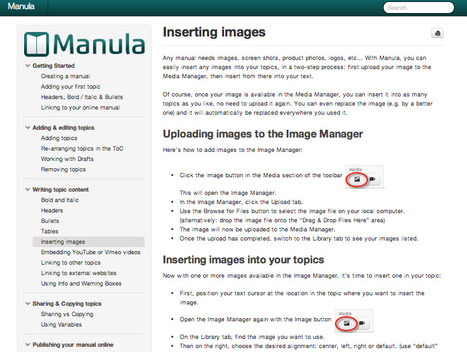
Manula is a web-based service which allows you to create professional-looking manuals and PDF guides with maximum ease and simplicity. Manula provides an online editor, that integrates all of the basic functionalities you may want to have during the preparation of an instructions manual including:
The final version of your manual can be instantly published to the web, with your own logo and organization name, or saved to a standard PDF file for distribution. Web version is perfectly viewable across devices and screens of all sizes and integrates a full search engine. My comment: Manula delivers what it promises. Reliable and easy editing and maintenance of multimedia manuals that need to be published to the web or via PDF and that can be seen across any device. If I had to mention a better alternative for non-tech users, that had no download, and that was as easy to learn or adopt, I would be in difficulty in suggesting one. Free version available. Try it out now: http://www.manula.com/ Pricing: http://www.manula.com/pricing (HT Ana Cristina Pratas)

Moses B. Tambason's curator insight,
November 15, 2013 10:22 PM
Watch this video to help the special needs in Africa this thanks giving holiday http://www.africatube.net/video/932/Neglected-people-of-Africa-need-your-help ;
Scoop.it!

The best tools, web apps and resources for any independent web publisher
Robin Good's insight:
If you need a handy reference for your web publishing needs I have spent a few days pulling together the best tools I use and know-of that I would recommend to use, in an organized and curated link directory of over 70 different categories. From "landing page builders" to "survey tools" and "domain name finders" I have you covered. In general, I have limited the amount of tools and services listed per category to the top 5 I know as to serve also as a curated filter for the vast number of choices available out there. This is definitely a work in progress as you need to continuously edit, refine and improve a directory like this to make it really useful. You are welcome to suggest tools and services that I have not included and I'll make sure that if they are valid ones they get their space too. Free to access. Full directory: https://web-publishing.zeef.com/

Ricardo Serrano's curator insight,
March 30, 2016 9:34 PM
If you need a handy reference for your web publishing needs I have spent a few days pulling together the best tools I use and know-of that I would recommend to use, in an organized and curated link directory of over 70 different categories. From "landing page builders" to "survey tools" and "domain name finders" I have you covered. In general, I have limited the amount of tools and services listed per category to the top 5 I know as to serve also as a curated filter for the vast number of choices available out there. This is definitely a work in progress as you need to continuously edit, refine and improve a directory like this to make it really useful. You are welcome to suggest tools and services that I have not included and I'll make sure that if they are valid ones they get their space too. Free to access. Full directory: https://web-publishing.zeef.com/ ; 
Nurkhamimi Zainuddin's curator insight,
April 3, 2016 3:07 AM
If you need a handy reference for your web publishing needs Robin Good has pulled together the best tools in an organized and curated link directory of over 70 different categories. Free to access. Full directory: https://web-publishing.zeef.com/
Nurkhamimi Zainuddin's curator insight,
April 3, 2016 3:08 AM
If you need a handy reference for your web publishing needs Robin Good has pulled together the best tools in an organized and curated link directory of over 70 different categories. Free to access. Full directory: https://web-publishing.zeef.com/
Scoop.it!
Robin Good's insight:
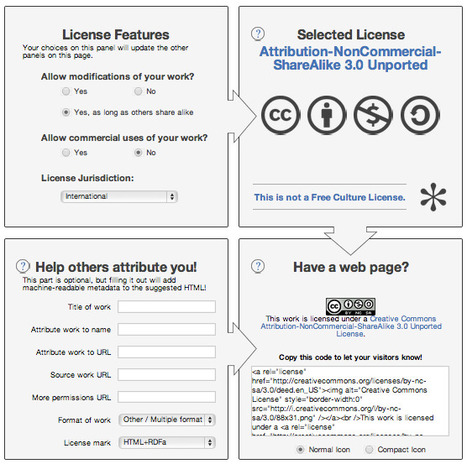
If you are a web publisher looking for an easy way to license some of your content under Creative Commons, here is a simple tool that can save you lots of time. Go to http://creativecommons.org/choose/ and just select your preferences for the type of license you want and this Creative Commons tool automatically generates a logo and also some code that you can copy and paste into your selected web pages. If you have an ebook or PDF I suggest you take a screenshot of the image and you include it with a link to the type of license you have selected. As a matter of fact this tool also provides the ability to generate a simple image that you can simply save by right-clicking on it. It remains your duty to link that image to the specific license type you have selected to make this truly effective. For clarifying first your doubts about which type of license to use, I suggest that you give look at these two excellent infographics which illustrate quite well the different options and license types you have available. a) http://visual.ly/what-creative-commons b) http://www.tagseoblog.com/what-means-creative-commons-infographic Finally, if you are interested in placing your work in the "public domain" without any type of license restriction you can do so here: http://creativecommons.org/publicdomain/ More info on CC license: http://creativecommons.org/licenses/ Considerations before licensing: http://wiki.creativecommons.org/Before_Licensing
Scoop.it!
|

|
Scooped by
Robin Good
July 29, 2013 1:12 PM
|
Scoop.it!
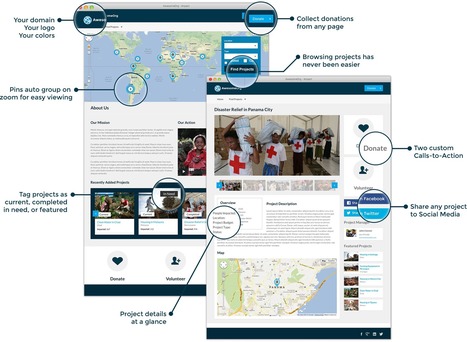
ImpactFlo is an incredibly powerful, yet beautifully simple end-to-end solution for showcasing impact and engaging supporters.
ImpactFlo is a web app which allows any organization, individual or company to showcase the "on-the-ground" impact of its projects and initiatives, by providing a simple database where to collect key information and a public web-based set of info-pages and impact maps where to illustrate visually the work done and the actual results to the public.
ImpactFlo makes it easy for those visiting such a hub to search through all of the projects realized by type, geographic location or by project needs and to engage with these projects by allowing visitors to easily share this content on social media.
Impact maps can be personalized with an organization logo, can be used to collect direct donations, and to organize projects separating the completed ones, by those upcoming or in progress.
Indispensable for NGOs of all kinds.
Find out more: http://impactflo.com/
|
|
Scooped by
Robin Good
June 23, 2013 4:23 PM
|
Scoop.it!
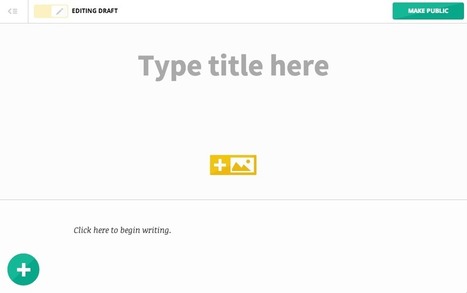
An intuitive, flexible platform for telling stories. Marquee's authoring tool and infrastructure allow for publishing beautiful content faster and easier than ever before.
Marquee.by is a web-based publishig platform designed for people who love to write and who like technology to intrude the least possible in their work.
Marquee.by has a clean, extremely simple and intuitive interface which allows you not to get distracted by many buttons and commands. Once you start editing a story you only have to worry about writing and deciding where you want to add images or links to other sites or stories.It takes in fact just the copy and paste of any link to embed any video or web site into your story.
It's as simple as that.
From the official site: "Marquee is a flexible publishing platform that helps you craft great content for your audience. It operates as a fully hosted service, or can integrate into your existing workflow."
You can get a personalized URL like RobinGood.marquee.by or you can publish directly under your domain name, and your final work can be seen perfectly across different types of computers and mobile devices.
Marquee.by is free for everyone for 60-days after your registration and then is $8/month. (no credit card required to sign-up)
Find out more: http://marquee.by/
Example site: http://heartbreakhell.marquee.by/
|
|
Scooped by
Robin Good
April 26, 2013 6:59 AM
|
Scoop.it!
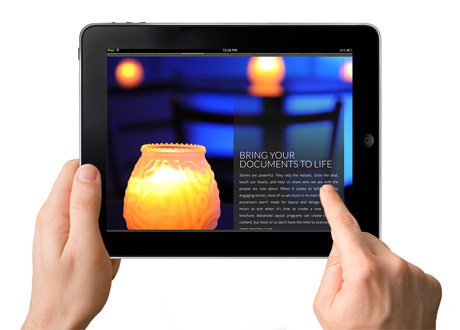
ReadyMag is a designer's dream interactive web publishing tool, allowing for the creation of digital magazines where the designer talents can be expressed without resistance.
The ReadyMag Constructor is in fact a wonderful set of real-time interactive widgets that facilitate to the maximum the design of a page layout, and the integration and formatting of relevant content, be it text, images or video clips.
ReadyMag Constructor provides precise control on all of the page design variables while providing a super cool and highly discrete set of widgets to manage them.
The final magazine can be watched on any browser in full screen, and in more than one fashion.
Final publications can be easily shared on Facebook, Twitter or Pinterest, and/or embedded directly into any web site or blog and are fully compatible with any screen-size or device.
In a future release, authors that publish their digital magazine through ReadyMag will also have the opportunity to charge for subscriptions.
My comment: Gorgeous interface, app architecture and widgets design. The final publication results can be quite impressive, though I would love to see as much innovation and slickness as offered in the "backed" UI, also in the display and delivery modes offered (which instead tend to follow pretty used up, though familiar, consumption modes).
If you are a designer, you MUST try this tool out.
Free to use.
Examples of ReadyMag magazines:
http://readymag.com/kirill/the-jazz-story/
http://readymag.com/u15041256/32/
Check out this video to see a finalized magazine:
Find out more: http://readymag.com/
Request an invite here: http://readymag.com/login

Strumento davvero fichissimo per creare mag interattive: ReadyMag
Στους δασκάλους και δασκάλες που προετοιμάζονται για πλήθος εκδόσεων.





















This is the right blog for anybody who really wants to find out about this topic.
You know a whole lot its almost tough to argue with you (not
that I personally would want to…HaHa). You certainly put a brand new
spin on a topic that has been written about for years.
Wonderful stuff, just wonderful!
If you are looking for an alternative free service to upload and share your PDF documents without requiring to register, login or pay fees, check out PDF.yt.
The free, non-commercial web service (which is supported by your donations) allows you to upload as many PDF files as you wish, with a max file size of 100MB. You don't need to register or login to upload a PDF file, but once uploaded you cannot deleted anymore.
PDF files are hosted permanently, can be viewed online along view stats, can be downloaded by anyone, there are no ads being displayed, and best of all, they are all permanently mirrored and archived on the Internet Archive Servers.
PDF files uploaded to PDF.yt can be set to "Public", "Unlisted" (only those who know the exact URL can access them) and can also be embedded anywhere.
An excellent alternatives to the likes of Slideshare, Scribd, Issuu or similar services and the perfect complement to permanently archive any PDF you don't want to lose track of.
Free to use.
Try it out now: https://pdf.yt/ ;